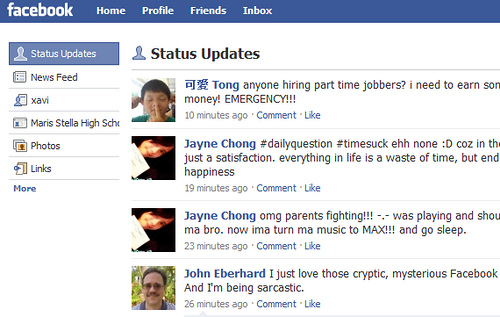
HOW-TO: Revert Facebook Homepage to Show Live Status Updates


A week ago, Facebook revamped its feeds, introducing a new feature that allows users to switch between getting real time streams of news or activities taking place, and highlights of what friends have shared online in the preceding 24 hours. Unfortunately, over 1.5 million users HATE the new Facebook and want the “amateur developers” at the Internet company to revert the homepage back to normal.

If you dislike the new Facebook homepage design, here’s a simple and easy trick to fix it…

1. Log in to your Facebook home page and then click the More link at the bottom of the far lefthand column.

2. Find the “Status Updates” box and drag it to the very top of the list.

3. Click “Status Updates” to load that view. Now when you login, you will see the old view.

Via ZDNet

Commercial WordPress themes

Tags:

5 Responses to “HOW-TO: Revert Facebook Homepage to Show Live Status Updates”

  1. yy1993
    31. Oct, 2009 at 7:46 am #

    But with this, we only see the statuses, right? Not what our friends are doing, isn't it?

  2. yy1993
    31. Oct, 2009 at 11:46 am #

    But with this, we only see the statuses, right? Not what our friends are doing, isn't it?

Trackbacks/Pingbacks

  1. Stephen Laughlin - 02. Nov, 2009

    HOW-TO: Revert Facebook Homepage to Show Live Status Updates: http://bit.ly/3fCeVE

  2. 9swords - 03. Nov, 2009

    RT @techxav HOW-TO: Revert Facebook Homepage to Show Live Status Updates http://bit.ly/U0ece

  3. Alexandra Popovic - 03. Nov, 2009

    RT @9swords: RT @techxav HOW-TO: Revert Facebook Homepage to Show Live Status Updates http://bit.ly/U0ece

Leave a Reply