![]()
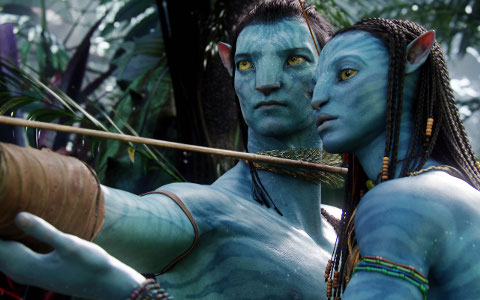
Have you ever wondered what software was used in the making of Avatar, touted as the “second highest-grossing film of all time worldwide”?
If you’re curious to find out what tools Cameroon has mainly used for the Avatar movie, then check out the list below compiled by Armand Niculescu of Twin Pixels.
- Autodesk Maya
- Pixar Renderman for Maya
- Autodesk SoftImage XSI
- Auodesk 3ds max (for control room screens and HUD renderings)
- Autodesk MotionBuilder (for real-time 3d visualisations)
- The Foundry Nuke Compositor (image compositing)
- Autodesk Smoke (color correction)
- Autodesk Combustion (compositing)
- Adobe After Effects (compositing, real-ime visualizations)
- PF Track (motion tracking, background replacement)
- Adobe Illustrator (HUD and screens layout)
- Adobe Photoshop (concept art, textures)
- Many tools developed in-house
- Countless plugins for each platform, some of them Ocula for Nuke, Ktakatoa for 3ds max, Sapphire for Combustion/AE.
Besides Adobe, here are some of the companies which have also contributed in the visual effects.
- Industrial Light and Magic, USA (most of the character design, modeling and effects)
- Weta Digital, New Zealand (most of the character design, modeling and effects)
- Framestoree, UK (Sully’s arrival at Hell’s Gate and two other shots)
- Hybride, Canada
- Prime Focus, USA (design and compositing of the control room screens, HUDs, etc)
- Look Effects, USA (compositing)
- Hydraulx, USA
- Giant Studios, USA (motion capture)
- Pixel Liberation Front, USA (screens and HUD design)
- Lola VFX, USA (digital cosmetic)
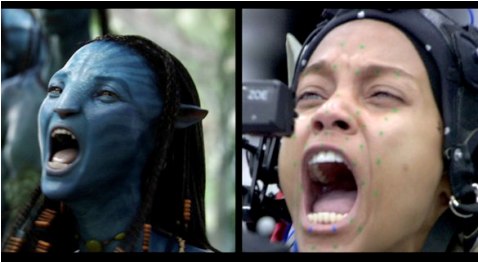
One of a state-of-art technology James Cameroon embraced is the use of a specially-designed virtual camera that allows him to observe directly on a monitor how the actors’ virtual counterparts interact with the movie’s digital world in real time and adjust and direct the scenes just as if shooting live action.
![]()
“It’s like a big, powerful game engine. If I want to fly through space, or change my perspective, I can. I can turn the whole scene into a living miniature and go through it on a 50 to 1 scale. To create the world of Pandora as seen in the film, it required over a petabyte of digital storage,” he said in an interview.
Via Wikipedia & Twin Pixels

Author Info

thanx for the heads-us
So cool its the actual software we use!
Quite a large omission: NewTek’s Lightwave.
“75-90% of all the Virtual world assets that Cameron used to shoot the film [were created in Lightwave]. So basically the Previs created by the Virtual Art Department.
The assets were designing and created by this team.” (http://www.newtek.com/forums/showthread.php?t=105373)
“Lightwave was used along with Maya and Motionbuilder to generate the low rez assets /sets so that James Cameron could navigate thru with a virtual camea. This allowed him to have direct input with creating camera motions.
Many of the shots were actually creatded by our group and the motions on the floating mountains, ships etc were saved exactly as we did the them. Weta basically replaced the low rez objects with higher rez versions. Most of what we did were the environments etc. I did alot of work on jungle sets and especially the floating mountains.
If you read Robs website the Virtual Art Department was far more then just “previz” because most of the camera moves or animations were kept intact.”
http://www.robpowers.com/hpages/havatar01.html
Odd that this article doesn’t mention Lightwave, even though:
“75-90% of all the Virtual world assets that Cameron used to shoot the film [were created in Lightwave]. So basically the Previs created by the Virtual Art Department.
The assets were designing and created by this team.” (http://www.newtek.com/forums/showthread.php?t=105373)
“Lightwave was used along with Maya and Motionbuilder to generate the low rez assets /sets so that James Cameron could navigate thru with a virtual camea. This allowed him to have direct input with creating camera motions.
Many of the shots were actually creatded by our group and the motions on the floating mountains, ships etc were saved exactly as we did the them. Weta basically replaced the low rez objects with higher rez versions. Most of what we did were the environments etc. I did alot of work on jungle sets and especially the floating mountains.
If you read Robs website the Virtual Art Department was far more then just “previz” because most of the camera moves or animations were kept intact.”
Read the full post by one the first tech hired:
http://www.robpowers.com/hpages/havatar01.html
I worked in the VAD (Virtual Art Department) for several months during the design phase of the movie. We used Lightwave 3D quite heavily.
A couple of omissions there. Lightwave was used for the lion’s share of virtual assets for the VAD as stated above and eyeon’s Fusion for compositing every shot by Prime Focus.